Skip to content
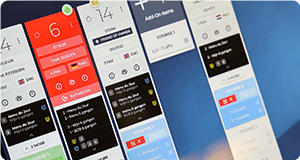
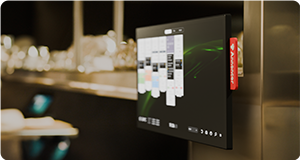
Annoncer Kitchen Management System software displayed on a professional kitchen screen

ANNONCER KITCHEN DISPLAY SYSTEM.

Annoncer is the Kitchen Display System (KDS) for restaurants and hotels, from bistros to fine dining, Michelin restaurants and luxury hotels. This specialised hospitality software brings orders, course timing and allergen information together in real time at the right station.

Our KDS provides a complete hospitality software solution, with one or more screens and control over timing and service.

REALTIME WORKFLOW

How our kitchen display system software works.

In a busy kitchen, great service depends on timing. As soon as the front of house team enters an order, our kitchen order display system ensures each station instantly receives the right information. From mise en place to serving, service follows four clear steps.

1. Receiving an order and automatically routing it to each station

As soon as the front of house team opens a table or calls for a course, the order enters the system. Annoncer reads the dishes, courses and dietary requirements, then automatically routes each item to the right station: garde manger, saucier, pastry or bar. Each station sees only what is relevant to them. The colour of each item immediately shows its status: blue for new, orange for in progress, green for ready and red for delayed. Timers start as soon as the item appears on screen.


2. Coordinating preparation and keeping track of timing

Preparation then begins. The challenge is getting different dishes and orders ready at different stations at the same time for one table. Annoncer coordinates timing continuously in real time. You can immediately see which preparation needs priority, helping you keep every course on schedule. The whole kitchen works at the same pace, with less need for verbal coordination or raised voices.


3. Notifying the front of house team when a course is ready

Once all plates for a table are ready, the kitchen team marks the course as ready with a single tap on the central screen. The front of house team immediately sees which table is ready to be served. This helps prevent dishes from being prepared too early and keeps them at the right temperature.

4. Serving and preparing for the next course

When serving the dishes, the front of house team marks the course as ‘served’ in the system. The KDS screen then immediately shows which course has been served to that table.

Real time updates keep the front of house and kitchen teams aligned. The front of house team schedules the next course, the table status stays up to date, and guests enjoy a smooth service. The kitchen order display system helps keep the kitchen calm while maintaining coordination between both teams throughout service.

Want to learn more about the concept behind a KDS? Read what a kitchen order display system is.

Traditional paper kitchen tickets used to manage restaurant orders
Annoncer Kitchen Management System replacing paper tickets with a digital workflow
TRADITIONAL KDS VS. ANNONCER KDS

More than a digital kitchen display system.

A traditional kitchen display digitises individual tickets for quick orders. In fine dining and luxury hotels, service centres on coordinating multiple courses and attending to guest details. As an advanced kitchen display system, Annoncer brings reservations, dietary requirements and the pace of each table together in one workflow. This allows you to proactively manage the entire service.

With this shared overview, the kitchen and front of house teams can immediately see dietary requirements and each table’s progress. This helps you serve courses at the right moment and maintain a calm service. Discover how Annoncer KDS 2.0 supports this.

Traditional KDS

Focus on orders
Digitises tickets, with limited support for the service as a whole.

Reactive workflow at each station
Teams respond to incoming tickets at their own station.

Limited context for teams and guests
Little visibility into timing, guest information and service progress.

Each station works independently
Each station focuses mainly on its own tasks, with less support for coordination and collaboration.

Annoncer KDS

Focus on the complete service
Kitchen, front of house and management teams work with the same real time information. Supports multiple courses, allergy requirements and coordinated serving. 

A proactive workflow for the whole team
Provides advance warnings of potential delays in real time and monitors the schedule for each course.

Full context for teams and guests
Guest preferences, allergen details and service information are always readily available.

A shared overview
Kitchen and front of house teams work with the same real time information, making operations more efficient.

THE ANNONCER SYSTEM

A system that connects everything.

A clear overview starts with every department working with the same information. As your specialist software partner, Annoncer brings kitchen, front of house and management together in one real time workflow. Our KDS software consists of several systems that continuously exchange information.

desktop (1)
ANNONCER KDS 2.0

A real time overview of orders, timing and the progress of every service.

guest-allergens
ALLERGY & GUEST MANAGEMENT

Make dietary requirements, allergens and personal preferences instantly visible to the right teams.

agenda-reservation
RESERVATIONS INTEGRATION

Connect reservations with operations and give teams advance insight into every service.

reporting
REPORTING & ANALYSIS

Turn operational data into valuable insights to continuously improve processes and performance.

picture-in-picture
Web apps

Give every team access to the right information, exactly where and when they need it.

touch-screen
Prestige Kitchen Displays

Bring the tools you already use into one system, exactly where your team needs them. 

"Annoncer brings calm and an overview to our kitchen, allowing us to fully focus on creativity and the guest experience."
Guido Braeken Restaurant Create **
Customer testimonial from chef Guido Braeken at Restaurant Create

The benefits of our kitchen display system.

1
More control

Every order, every course and every table in one real time overview. Make the right decisions faster, even during your busiest services.

2
BETTER COLLABORATION

Kitchen, front of house and management teams work with the same up to date information. Less coordination, fewer mistakes and a smoother service.

3
A BETTER GUEST EXPERIENCE

Guests may not see the system, but they experience the calm, timing and consistency it makes possible.

ADAPTABLE TO EVERY SITUATION

For every kitchen: from restaurants to hotels.

Whether you serve multiple courses, shared dining or à la carte, every kitchen has its own rhythm. Annoncer brings orders, timing and guest information together. Our KDS adapts to the way you work, giving kitchen and front of house teams a shared overview.

Restaurants and bistros.

From sharing dishes to a full à la carte dinner, a restaurant kitchen display system helps you coordinate orders and preparation. Your team sees what each table needs, including any dietary requirements. Even during busy services, this KDS for restaurants keeps progress clear and easy to follow.

Fine dining and Michelin restaurants.

With tasting menus, every course requires close coordination between kitchen and front of house. Annoncer displays the menu structure, dietary requirements and each table’s progress in real time. The kitchen display system supports the timing of every course, allowing the brigade to focus on preparation and presentation.

Hotels and luxury hotels.

Hotel kitchens handle restaurant orders, room service and banqueting. A restaurant KDS helps you coordinate these services and maintain an overview across multiple kitchens and service points. When choosing a KDS for hotels, this coordination matters: your team knows what is needed, for which guest and at what time.

Trusted by the world’s best restaurants and hotels, running 1000+ services every day.

Designed for control throughout every service.

A calm kitchen takes coordination. A kitchen display system gives you more than a screen. Its unique features help you see priorities and maintain a clear overview. Explore these features below.

Annoncer Kitchen Management System showing menus, courses and modifiers
Menu's and courses

Keep an up to date overview of menus, dishes and additions for each table.


Guest preferences and allergy information in the Annoncer Kitchen Management System
Guest preferences & allergies

Make dietary requirements, allergens and personal preferences instantly visible to the right teams.

Grouped kitchen tickets in the Annoncer Kitchen Management System
Ticket grouping

Group multiple tables while keeping a clear overview and control over timing.


Restaurant reservation integration in the Annoncer Kitchen Management System
Reservations integration

Know who’s coming in advance and give your team immediate insight into the service. Explore our KDS integrations.

Table timeline with complete order history in the Annoncer Kitchen Management System
Full timeline per table

See everything happening at a table, from first order to last course. 

Visual ticket markers in the Annoncer Kitchen Management System
Ticket markers

Draw immediate attention to important information with clear visual markers.

How much does a kitchen display system cost?

A KDS pays off through a calmer kitchen and a clearer overview. The investment consists of three parts, so you know exactly what you’re paying for.

  • Software licences: you pay per screen connected in your kitchen. More stations mean more licences.
  • Hardware: touchscreens that withstand heat, grease and moisture. They need to be durable enough to handle everyday kitchen use.
  • Implementation and training: we make sure your team knows how to use the system so they can work with it efficiently.

View the current prices and costs for our Annoncer kitchen display system on the pricing page.
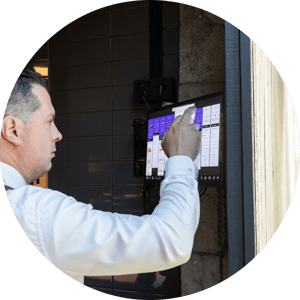
 

Mark Schellingerhout - Create by Guido Braeken

Frequently asked questions about the kitchen display system.

Find answers to frequently asked questions below. Can’t find your question? Visit our full FAQ page.

What is Annoncer, and how does it differ from a standard kitchen display?

Annoncer is a kitchen display system for restaurants and hotels, from bistros to fine dining, Michelin restaurants and luxury hotels. It brings orders, courses and timing together in one live overview. Whether you offer à la carte, shared dining or tasting menus, your team can see what each station and table needs, including dietary requirements. The kitchen display system app helps kitchen and front of house teams coordinate preparation and serving, creating a calmer service.

Want to know more? Read what a kitchen display system is and how it differs from a kitchen screen or kitchen printer that primarily displays or prints order tickets.

Why not an all in one hospitality platform?

Annoncer is designed to support operations during service. Rather than combining as many features as possible in one platform, Annoncer focuses on the areas with the greatest impact: communication, timing, collaboration and operational control. Integrations with existing hospitality systems give you the best of both worlds.

Does Annoncer work with your existing POS and reservation software?

Yes. Annoncer integrates with widely used POS and reservation systems. Your existing workflow stays in place, while Annoncer adds kitchen coordination. Reservations, guest profiles, dietary requirements and allergies come together on the kitchen screen. Your brigade knows exactly what table 12 needs, without separate notes or duplicate data entry. Explore our integrations for available connections and configuration options.


How does Annoncer help during the busiest moments?

During busy services, having the latest information is essential. Orders are automatically routed to the right stations, and everyone can see the pace of each table. Your team immediately knows which preparation takes priority, what can wait and when dishes need to be served together. This helps prevent miscommunication, shouting across the kitchen and forgotten dishes, even on the busiest evenings.


How does Annoncer reduce operational costs and waste? By reducing the need for manual communication and helping teams work together more efficiently, Annoncer helps minimise errors, food waste and unnecessary interruptions. Teams also gain greater control over operations, allowing them to work more efficiently even during busy services. 

Ready for greater clarity and control during every service?

Discover how Annoncer connects your kitchen and front of house. Let us show you how the system fits your team and the way you work.