


What you might want to know.
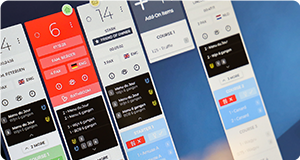
Annoncer is an operational service management platform. It connects reservations, guest information, the kitchen, front of house and management in one real time overview. This gives every team access to the same information, helps operations run more smoothly and provides greater control during the moments that matter most.
Discover Annoncer.
Annoncer brings all operational information together in one central workflow. Orders, timing, dietary requirements, allergies, VIP information and tasks are automatically shared with the right teams. This ensures everyone knows exactly what needs to happen, without unnecessary communication or interruptions.
Explore why Annoncer is more than a KDS.
Annoncer is built for restaurants, hotels and hospitality concepts where quality, timing and collaboration are essential. From fine dining to luxury hospitality, Annoncer helps teams work more efficiently, reduce errors and deliver a consistent guest experience.
Annoncer helps reduce operational costs by enabling teams to work more efficiently together. Fewer mistakes, less food waste, fewer guest compensations and better staff allocation all contribute to a more efficient operation. It also eliminates the need for paper tickets, kitchen printers and their ongoing maintenance.
A traditional Kitchen Display System digitises kitchen tickets. Annoncer supports the entire operation throughout service. From reservations and guest information to timing, communication and food collection, every team works with the same real time information. This creates greater visibility, better collaboration and more control throughout every service.
→ Discover why Annoncer is more than a KDS
Yes. Annoncer replaces paper tickets and kitchen printers with a fully digital workflow. Orders are automatically shared with the right workstations, including timing, guest information, dietary requirements and other relevant details. This helps the entire operation work faster, with greater visibility and without paper.
On the contrary. Annoncer gives chefs greater visibility into everything happening during service. You can monitor the progress of every order in real time, manage timing and maintain oversight across all workstations. This allows you to respond more quickly and stay in control, even during the busiest services.
Annoncer gives managers real time visibility across the entire operation. You can see how service is progressing, identify bottlenecks and understand where teams need support. With one shared operational view, you can manage more efficiently, improve collaboration and maintain greater control throughout service.
We believe in a best of breed approach. Annoncer integrates with the systems you already use, including your reservation, POS and PMS platforms. This gives you the freedom to choose the best solution for each part of your operation, while bringing all operational information together in one shared operational view. The result is greater flexibility without compromising collaboration or control.
→ Discover how Annoncer integrates with your existing systems
Yes. Annoncer is built for restaurants, hotels and hospitality operations with multiple kitchens, restaurants or outlets. Each department works with the same real time information, while every workflow is tailored to its own operational needs. This keeps communication, timing and collaboration organised, regardless of the size or complexity of the operation.
Yes. Annoncer is designed for hospitality teams, not IT specialists. Its intuitive and user friendly interface allows staff to get up and running quickly with minimal training. This also makes onboarding new team members faster and easier.
Annoncer gives chefs real time visibility into the progress of every order. You can instantly see what is being prepared, what is almost ready and where attention is needed. This helps you maintain oversight, make faster decisions and keep service timing under control, even during the busiest shifts.
→ Discover how chefs use Annoncer
Yes. Annoncer supports a wide range of hospitality concepts, including à la carte, shared dining, tasting menus and set menus. Every dish remains linked to the correct table and course, helping both the kitchen and front of house maintain visibility and control, even with complex orders.
Yes. Annoncer is built for restaurants where timing is essential. Dishes are automatically managed by course and presented at exactly the right moment, allowing the kitchen and front of house to stay perfectly coordinated. This ensures multi course menus are delivered with precision and guests receive every course at the right time.
Absolutely. Annoncer ensures the kitchen, bar and front of house all work with the same real time information. Orders, updates and service progress are shared instantly across teams. This creates smoother collaboration and helps everyone stay in sync, even during the busiest services.
That depends on the size of your operation and the way your teams work. Smaller restaurants often only need a few screens, while hotels and larger restaurants typically require multiple workstations. We'll be happy to advise you on the setup that best fits your kitchen and workflow.
Yes. Annoncer groups orders by table, giving both the kitchen and front of house a complete overview at all times. This is especially valuable for large parties, shared dining and multi course menus, where timing and coordination are essential.
→ Discover more Annoncer workflow features
Annoncer automatically displays allergies, dietary requirements and other guest preferences at the relevant workstations. This information is shared in real time, ensuring the kitchen and front of house always work with the same up to date information. This reduces the risk of mistakes and helps deliver a safer, more personalised guest experience.
Through its integration with your reservation system, relevant guest information is available throughout service. This includes previous visits, preferences, allergies and other important details. It enables your team to deliver a more personalised experience without having to search for information manually.
→ Discover how Annoncer centralises guest information
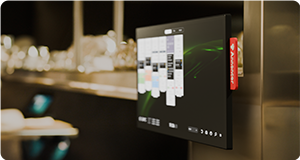
Annoncer runs on standard hardware and integrates easily with your existing hospitality systems. During implementation, we work with you to determine the hardware and infrastructure that best fit your operation, ensuring a smooth setup and a fast implementation.
Annoncer provides both real time and historical insights into your operation. You can analyse performance, preparation times, workload, service timing and order progress to identify bottlenecks, support operational improvements and make better informed decisions.
In some cases, yes. Annoncer supports a wide range of professional touchscreens and hardware configurations. During implementation, we'll assess your existing environment and recommend the setup that best fits your operational requirements.
Annoncer is continuously enhanced with new features, improvements and integrations. Updates are automatically delivered and included in your subscription, ensuring you always have access to the latest version of the platform.
During peak service, Annoncer gives every team real time visibility into the progress of service. Orders, timing and guest information are shared automatically, ensuring the kitchen, bar and front of house all work with the same up to date information. This helps maintain visibility, prevents misunderstandings and keeps your operation under control, even during the busiest moments.
Annoncer helps hospitality teams work more efficiently by streamlining communication and automating operational workflows. This leads to fewer mistakes, less food waste, fewer guest compensations and more efficient staff allocation. The result is not only a smoother service, but also lower operational costs
When an order is changed in the POS, Annoncer can immediately make the updated information visible to the relevant kitchen stations. Changes such as cuisson, garnishes, allergies or additional dishes can therefore be communicated without relying on handwritten changes or verbal communication.
Depending on your workflow, changes can be displayed directly or presented for confirmation, helping your team stay informed throughout service.
Yes. Annoncer is designed to keep your core operational workflow running locally if the internet connection is temporarily unavailable. Your kitchen can continue working, while cloud based information and services may temporarily stop updating until the connection is restored.
The exact availability of incoming orders during an outage may depend on your POS system and integration.
Annoncer integrates with more than fifteen leading POS systems, including Lightspeed, Infrasys, Simphony, Silverware, unTill and Winston POS. Orders are automatically synchronised between the POS system and the kitchen, ensuring every team works with the same real time information.
Annoncer integrates with leading reservation systems, including Zenchef, TableCheck and CoverManager. Guest information, allergies, dietary requirements and other relevant details are automatically shared with the right teams, ensuring everyone has access to the same real time information throughout service.
Yes. Every hospitality operation is different. That's why Annoncer is configured to match your kitchen, workflows and service concept. Whether you operate à la carte, shared dining, multi course menus or multiple outlets, the workflow is designed to fit the way your team works.
That depends on the size and complexity of your operation. A single site implementation can often be completed within a day. For hotels, multi site operations or more complex environments, we create an implementation plan that fits your operational requirements and schedule.
Yes. Annoncer supports multiple languages and can be configured per screen or workstation. This allows every team member to work in the language that best suits them. If your preferred language is not yet available, we'll be happy to discuss the possibilities.
All data remains the property of your organisation. Annoncer processes and secures this data solely to provide its services. You always retain full ownership and control of your data.
Read more about our data privacy & security here.
Data security is at the core of Annoncer. All data is securely stored and processed within a protected cloud environment. As an ISO 27001 certified organisation, we follow internationally recognised information security standards, giving you confidence that your data is managed in a secure and reliable environment.
Read more about our data privacy & security.
Yes. In addition to the Annoncer workflow, you can also use the screens to access approved web applications, such as your reservation system, supplier portal or other operational tools. This allows you to get even more value from your screens throughout the day.
Yes. We support you throughout the entire implementation process. Your team receives comprehensive onboarding and training, enabling everyone to become confident with Annoncer quickly. If required, we also provide support during your go live.
Annoncer combines the benefits of cloud technology with reliable performance during service. Management, configuration and reporting are handled through the cloud, while the operational workflow is designed to support continuity throughout service. This gives you the flexibility, security and reliability your operation depends on.
No. Annoncer is built for hospitality, not IT. Day to day management is straightforward, and updates are delivered centrally. This keeps the platform up to date without requiring significant time or effort for technical maintenance.
→ Discover how easy Annoncer is to manage
From implementation through to day to day operations, you can rely on support from our team and our global partner network. Depending on your location and service agreement, we provide remote or on site support to help you get back up and running as quickly as possible.
Yes. Through our international partner network, Annoncer provides support across multiple countries, languages and time zones. This enables international hotel groups and restaurant brands to benefit from local expertise and responsive support.
Contact us to learn more about our global partner network.
Yes. All updates, improvements and new features are included in your subscription. This ensures you always have access to the latest version of Annoncer without additional costs or complex upgrade processes.
Annoncer uses a transparent subscription model. You pay based on the number of screens you use, with no hidden fees or mandatory feature packages. This gives you complete clarity about your costs from the start.
Learn more about our pricing plans here.
No. Every Annoncer customer has access to the full functionality of the platform. We don't use tiered software packages that unlock features at a higher price. You only pay for the number of screens you use.
Learn more about our pricing plans here.
Yes. You can easily schedule a personalised demo or contact us for more information. We'll be happy to show you how Annoncer supports your hospitality operation and answer any questions you may have.
Interested in partnering with Annoncer? We'd be happy to explore the possibilities with you. Get in touch to discover how we can create value together for hospitality organisations.
More resources.

Learn how we handle your data and security.
Read More
See how Annoncer connects with your existing system.
Read More
Discover how restaurants use Annoncer in practice.
Read More
Explore insights that help you improve performance.
Read MoreCan't find your answer?
No worries, it happens. Just reach out and we’ll help you out.
info@indexhospitality.com
+31 73 657 9051
support@indexhospitality.com
+31 73 657 9051