More than a Kitchen Display System.KDS 2.0
Traditional Kitchen Display Systems digitize tickets.
Annoncer connects reservations, guest information, kitchen, front of house, and management in one shared real time workflow, giving hospitality teams greater control throughout every service.
Service shouldn’t depend on reacting.
During a busy service, chefs need to know more than which orders have arrived. They need to see which courses are being prepared, which tables are waiting and what needs attention next.
Paper tickets and basic kitchen display systems can make this difficult. Information is often organised around individual orders, while the kitchen needs to coordinate the entire table. When timing and progress are unclear, teams rely more heavily on verbal updates and last-minute decisions.
A kitchen order management system should support the way your team works, giving chefs the overview they need to manage service.

Where standard systems fall short.
Printed tickets and fixed order lists can make it difficult to adjust priorities as service progresses.
Individual orders are visible, but the progress of courses and tables may be harder to follow.
Some systems offer limited flexibility to organise information around the way your kitchen works.
Without a clear overview of timing and progress, teams spend more time responding to changes during service.
Standard KDS vs Annoncer: what's the difference?
A standard kitchen display system primarily helps teams receive and process orders digitally. Annoncer takes a broader approach by organising orders around courses, timing and the progress of service.
The difference becomes especially relevant in restaurants where several stations need to coordinate dishes for the same table.
Standard KDS
Focuses on displaying, managing and processing individual kitchen orders.
Shows which orders are waiting, currently being prepared or ready to serve.
Each kitchen station receives the relevant order information needed to complete its tasks.
Standard KDS: Primarily designed to display and process kitchen orders.
Annoncer
Organises orders around courses and the progress of each table.
Helps chefs coordinate preparation and service across courses.
Connects relevant information across kitchen stations and front of house.
Annoncer: Designed to support timing, coordination and control throughout service.
Service, structured in real time.
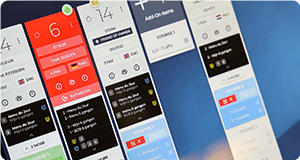
Annoncer connects orders, courses and kitchen stations in one real-time workflow. Instead of managing separate tickets, chefs can follow the progress of service and see what needs to happen next.
As a kitchen order system, Annoncer receives orders from the POS and makes relevant information available at the right stations. Dishes can be grouped, prioritised and organised around the timing of each course.
This gives kitchen teams a clearer overview of the work ahead, while front of house stays informed about the progress of service.
- Course-based organisation: Keep track of orders across tables and courses.
- Real-time updates: Share relevant changes and progress between stations.
- Flexible workflows: Organise tickets and information around the way your kitchen operates.

Built for kitchens where timing matters.
In fine dining, timing involves more than preparing individual dishes. Multiple stations need to work towards the same moment, while each table moves through its own sequence of courses.
Annoncer helps chefs manage that complexity. With a clear overview of orders, courses and their progress, the kitchen can coordinate preparation around the pace of service. Front of house stays informed, making it easier to manage the transition between courses.
Whether you're serving a tasting menu or coordinating several tables at different stages of their meal, Annoncer supports the precision and communication your team needs


Features that bring structure to service.
Every kitchen has its own way of managing orders, courses and communication. Annoncer gives teams the flexibility to organise information around their workflow, while keeping the progress of service visible.
Explore the features that help chefs manage orders, respond to changes and coordinate work between stations.
- Ticket grouping
- Alerts and notifications
- Sorting, reordering and renaming
- Printing options
Ticket grouping

Group tickets in a way that matches how your kitchen operates. For example, during a tasting menu service, chefs can organise dishes around the courses being prepared instead of managing every ticket separately.
This gives the team a clearer view of what needs attention and helps different stations coordinate their work.
Alerts and notifications

During service, changes can happen quickly. Annoncer uses alerts and notifications to draw attention to important updates, delays and timing issues.
Relevant information becomes visible on screen, helping chefs respond to changes without relying entirely on verbal communication between stations.
Guest preferences and dietary requirements also deserve attention. Discover how Annoncer supports Allergy & Guest Management.
Sorting, reordering and renaming

Organise tickets and items around the way your kitchen works. Sorting, reordering and renaming options allow teams to adjust how information appears on screen.
This helps chefs focus on the dishes and orders that need attention, while keeping the workflow familiar to the team.
Printing options

Printing options
A digital kitchen workflow does not always mean removing every printer. Some restaurants may still need printed information at specific stations or during particular parts of service.
Annoncer offers flexible printing options, allowing kitchens to combine digital order management with printing where it supports their existing processes.
From reacting to control.
Annoncer brings orders, course timing and service progress together in one clear overview. Chefs can see what needs attention and coordinate preparation across kitchen stations.
With real-time updates shared between kitchen and front of house, your team stays informed throughout service.
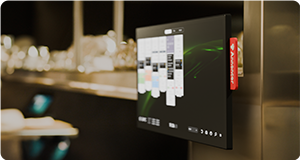
Explore our mounting solutions to find the right screen setup for your kitchen.

Frequently asked questions.
A kitchen order management system is software that helps restaurants organise, track and manage orders during service. It typically receives orders from a POS system and displays relevant information on kitchen screens.
More advanced systems can also support course timing, station coordination and communication between kitchen and front of house. Annoncer combines these functions in one workflow, helping chefs follow the progress of service instead of managing individual orders in isolation.
New to kitchen display systems? Read our guide: What is a Kitchen Display System?
A standard Kitchen Display System (KDS) primarily displays orders digitally and helps kitchen teams track their preparation status.
A kitchen order management system can provide additional tools for organising orders, managing courses and coordinating work between stations. Annoncer focuses on the entire service workflow, bringing timing, order progress and relevant guest information together. This is particularly useful in restaurants where several courses and kitchen stations need to be coordinated.
Yes. Annoncer is designed to support restaurants where several courses need to be prepared and served in the right sequence.
Instead of treating every order as an isolated ticket, Annoncer organises information around courses and the progress of each table. This helps chefs coordinate preparation between stations and maintain an overview of service. It is particularly relevant for fine dining restaurants, tasting menus and hotel restaurants with more complex service requirements.
Annoncer connects with compatible POS systems to receive orders and make them available to the relevant kitchen stations.
The exact integration depends on the POS provider and the configuration used by your restaurant. Before implementation, the Annoncer team can review your current setup and discuss the available integration options.
This helps you understand how Annoncer would fit into your existing operation and whether any changes are needed.
Yes. Annoncer includes ticket grouping, sorting, reordering and renaming options that help kitchens organise information around their workflow.
For example, chefs can group tickets to support multi-course service or adjust the order in which information appears on screen. These functions give teams more flexibility when managing orders across different stations.
The aim is to make the information easier to follow while allowing chefs to maintain their preferred way of working.
Discover what your KDS could be.
See how Annoncer brings orders, course timing and kitchen communication together in one real-time workflow. We'll show you how it can support the way your team works during service.
Want to understand the investment first? Explore Annoncer pricing.

