Skip to content
Chefs reviewing kitchen data together

Turn service data into better decisions.Because details aren’t optional, they’re critical

Annoncer turns kitchen and service data into clear insights on timing, preparation and bottlenecks. Improve every service with restaurant analytics software that complements your sales and POS reports, without manual reporting. 

What is restaurant analytics for the kitchen?

A restaurant analytics platform brings kitchen and service data together, so chefs and managers can review timing, flow and consistency alongside commercial results. 

Beyond sales and revenue
See how long preparation took, how courses moved through service and where pressure increased. This gives commercial results the operational context needed to understand how the service was delivered.

Built around kitchen performance
Annoncer focuses on timing, flow and consistency. Service activity becomes structured information that chefs and managers can review without reconstructing the evening afterwards.

Discover the complete Annoncer kitchen operations software.

THE CHALLENGE

Most kitchens run on instinct, not insight.

hourglass-start
Unclear delays
You notice that service is slowing down, but cannot easily see where the delay started. 
funnel
Recurring bottlenecks
The same station or course creates pressure across multiple services without a clear pattern being recorded. 
bomb
Inconsistent results
Similar shifts produce different timing and flow, making consistency difficult to evaluate. 
fire-extinguisher
Reactive decisions
Changes are based on individual moments or memory instead of comparable service data. 
THE SOLUTION

See what actually happens during service.

Annoncer captures kitchen activity in real time and turns it into structured insight for each service. Ticket progress, preparation activity and timing become part of a record that can be reviewed during or after the shift.

Automatically captured
Service data is recorded as orders and courses move through the kitchen.

Structured around performance
Timing, flow and operational activity are brought together in clear reporting views.

Ready to investigate
Trace delays, compare services and identify recurring patterns that deserve attention.
Reporting-1
KEY METRICS

The numbers behind every service.

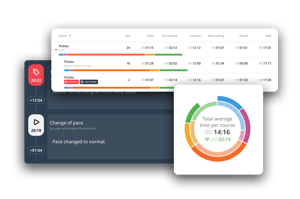
The restaurant analytics dashboard brings the metrics that explain kitchen and service performance together in one view. Together, these restaurant analytics tools turn individual service moments into information you can investigate and improve.

Learn how to use restaurant data beyond sales figures.

stopwatch
Ticket and preparation times
Review how long tickets, dishes and preparation steps take.
history (1)
Course timing

See how courses move through service and how much time passes between them. 

funnel (1)
Station bottlenecks

Identify where delays or pressure repeatedly develop.

reporting (1)
Service and shift performance

Compare timing and flow across services, shifts and periods. 

stethoscope
Workload and progress

Follow workload, timing and progress while service is running.

repeat (2)
Consistency over time

Use recurring patterns to understand where results vary.

From service activity to practical insight.

Data collection takes place within the existing service workflow. Your team does not need to maintain a separate reporting log. 
1
Capture
Annoncer records service activity automatically as orders and courses move through the kitchen.
2
Analyse
The data is organised into clear views of timing, workload, delays and operational flow. 
3
Improve
Compare services and investigate recurring patterns. Use what you learn to refine preparation, timing and consistency.
IN PRACTICE

Restaurant analytics in practice.

Rather than adding a separate restaurant analytics app to the team’s workflow, Annoncer turns activity already captured during service into four practical views.

Statistics report dashboard with kitchen performance metrics


Use online restaurant analytics to review performance across services, shifts and longer periods. See where delays occur and how the kitchen operates over time. 

Real time kitchen operations dashboard


Follow workload, timing and progress in real time while service is running. 

Kitchen activity timeline showing service events and changes


Review the sequence of actions and changes with their timing and operational context.

Performance comparison chart for kitchen service data


Compare services, days or periods to recognise patterns and understand what changed. 

THE RESULT

Insight without disruption.

Annoncer captures data as part of the service workflow, without extra reporting steps or manual input. Reviewing performance does not depend on someone completing a separate log after the final table leaves.

Analytics becomes a natural extension of the operation. Chefs and managers gain a clearer view of timing and flow without distracting the team from preparation, guests and service.

“The biggest difference is the overview. Everything is visible at a glance.”
Restaurant Olijf

Explore more experiences from restaurants and hotels using Annoncer.

Chef preparing a dish in a professional kitchen
CONNECTED OPERATIONS

Works with the rest of your operation.

Annoncer’s restaurant reporting software adds kitchen and service performance to the information already available elsewhere in your operation. 
Kitchen and service insight
Add timing, preparation and service flow to the commercial picture provided by your POS and revenue reporting. 
POS & Integrations
Connect Annoncer with supported POS systems and hospitality technology. View the available Annoncer integrations. 
Reservations & Context

Bring relevant reservation information into the operational workflow before service starts. Explore the reservations integration.

Review Annoncer software pricing.

Questions about restaurant reporting and analytics.

What does Annoncer measure?
Annoncer records operational information generated during service. This includes ticket and preparation times, course timing, workload, progress and delays. Reporting views allow you to compare services, shifts and periods. This helps you see where processes slow down, which patterns return and when further investigation or a change in the way the team works may be useful.
Which kitchen KPIs can I review?

Relevant kitchen KPIs include ticket time, preparation time per dish, course or station, time between courses, recurring delays and performance across services or shifts. These figures add operational context to commercial results. They help chefs and managers understand how a service ran, where differences developed and which parts of the operation they may want to follow across multiple services.

How is the data collected? Annoncer captures service activity automatically while orders and courses move through the kitchen. This data is organised into reporting, dashboard, timeline and comparison views. Because recording is part of the normal workflow, the team does not need to reconstruct the service from memory afterwards. You can review events and compare patterns across services, shifts or longer periods.
Do I need to enter reporting data manually?

No. A separate manual reporting step is not required for the service activity captured by Annoncer. Data is recorded as part of the normal operational workflow, so the team does not need to maintain another log or spreadsheet after service. Reports are based on activity recorded in Annoncer, giving chefs and managers a shared source of information for their review.

Does Annoncer replace my POS or revenue reporting?

No. POS and revenue reports show what was ordered, sold and earned. Annoncer adds insight into the timing, flow and consistency behind those results. Together, they provide a more complete view of the service: the commercial result and the operational execution. This helps you compare services with similar revenue but different preparation times, course timing or bottlenecks. 

Does Annoncer connect with other restaurant systems? Annoncer connects with supported POS systems and reservation platforms. This allows relevant information to move between systems and become part of the operational workflow. The available connection depends on the system and configuration in use. Check the integrations page for current partners and connection types. If your system is not listed, contact Annoncer to discuss the available options. 

See where your next improvement starts.

Turn service data into clear insights that help you improve timing, flow and consistency.