
PRESTIGE KITCHEN DISPLAYS FOR PROFESSIONAL KITCHENS.KDS 2.0
Our kitchen displays are designed for intensive daily use in restaurants and hotels. Clear, robust and built to work with Annoncer, helping your team keep track of every service.
Kitchen display screens for professional kitchens.
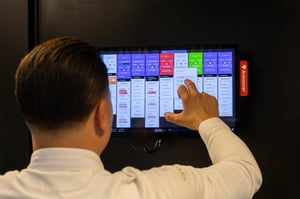
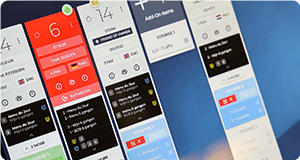
A kitchen display monitor is the touchscreen your team uses to work with Annoncer. Annoncer is the software that brings together orders, courses and service progress. This helps kitchen and front of house teams coordinate their work using up-to-date information.
Prestige kitchen monitors combine a touchscreen, a built-in computer and a robust housing for daily use in professional kitchens. They can be used at individual workstations or at the main pass, where dishes are checked before being sent out. We help you choose the screens that suit the tasks and available space in your kitchen.

Which kitchen screen size suits your kitchen?
Prestige kitchen screens are available in 15.6, 18.5 and 24 inches. The right size depends on the viewing distance, the available space and how much information you want to see at once. A larger screen can provide a broader overview, while a compact model takes up less space at an individual station.
Consider the tasks at each workstation. Does a team member mainly need to follow their own orders, or oversee several stations? We help you choose a size that keeps the information easy to read and the touch controls within comfortable reach.

A compact kitchen screen for workstations with limited space.

A medium-sized screen for workstations where you need more display space than the compact model offers.

A larger (single) kitchen display screen for workstations where multiple orders and information come together, such as the main pass.
Technical specifications of Prestige kds screens.
 INTEL CORE i3 N305
The energy-efficient Intel® Core™ i3 N305 processor provides the computing power to run Annoncer smoothly, helping your team process orders and updates quickly.
 8 GB RAM
The 8 GB DDR5 memory supports fast performance when switching between views and handling several tasks at once.
 WINDOWS 11 LTSC
Windows 11 LTSC provides an operating system with long-term support. This helps with planning security updates and technical maintenance.
 IP66 CERTIFIED
The IP66 rating indicates protection against dust and water. This suits kitchen environments where moisture and splashes occur. Always follow the cleaning instructions.
 FULL HD RESOLUTION
Full HD resolution provides a sharp display of orders, courses and notes, helping your team read the details on screen clearly.
 SCRATCH-RESISTANT COATING
The screen features a scratch-resistant nanocoating. This protective layer helps reduce scratches from daily use and keeps the screen surface in good condition.
Annoncer on an external touchscreen.
The Prestige Controller lets you use Annoncer on an external touchscreen. The computer and screen are separate components, offering an alternative to a kitchen screen with a built-in computer.
Already have a touchscreen you would like to keep using? We can check whether it is suitable for Annoncer. We look at the connections, touch controls and suitability for use in your kitchen. This helps you understand whether you can keep your existing hardware and what you need to get it working.
Contact us with the make and model number of your screen so we can advise you on your setup.

The right place for your kitchen screen display.
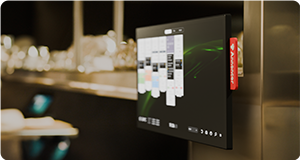
Wall, ceiling or worktop mounting gives your restaurant kitchen screen a fixed position that suits your kitchen layout. The right solution depends on the available mounting points and the work taking place around the screen.
Day-to-day maintenance matters too. You need access to clean around the screen and keep cables neatly tucked away. In an existing kitchen, we look at how the mounting can fit into the current layout. This helps you choose a solution that suits your space and daily use.

More focus on service.
During service, you need to know what is coming up at your station and which courses are still to follow. Annoncer gives your team access to current order information, helping them coordinate preparation and send dishes out at the right time.
When kitchen and front of house teams work from the same information, fewer questions are needed to check on progress. This leaves more attention for preparation, the finishing touches on each plate and the guest at the table. The technology supports the work; your team sets the pace and maintains the quality.

Which kitchen screen suits your team?
You can compare specifications, but a demo shows you how Annoncer works on our kitchen screens. See how orders are displayed, explore the controls and ask the questions that matter to your kitchen.
Tell us how you run your service and where your team faces challenges. Together, we can look at which hardware suits your needs. This gives you a clear idea of the options before you make a decision.